
Quick Answer
A job hazard analysis should ask where the person becomes hard to see, who must notice them, what controls already exist, whether a wearable light improves recognition, and what mount, mode, charging, and supervision rules are required.
Definition
wearable safety light job hazard analysis guide: A wearable safety light job hazard analysis guide helps teams decide whether active personal visibility should be included in a task plan by reviewing hazards, visibility gaps, current controls, and user behavior.
Key Takeaways
- A job hazard analysis should ask where the person becomes hard to see, who must notice them, what controls already exist, whether a wearable light improves recognition, and what mount, mode, charging, and supervision rules are required.
- The document should define owner, user group, use condition, mount, mode, evidence, and follow-up.
- A wearable safety light supports required PPE and procedures; it does not replace them.
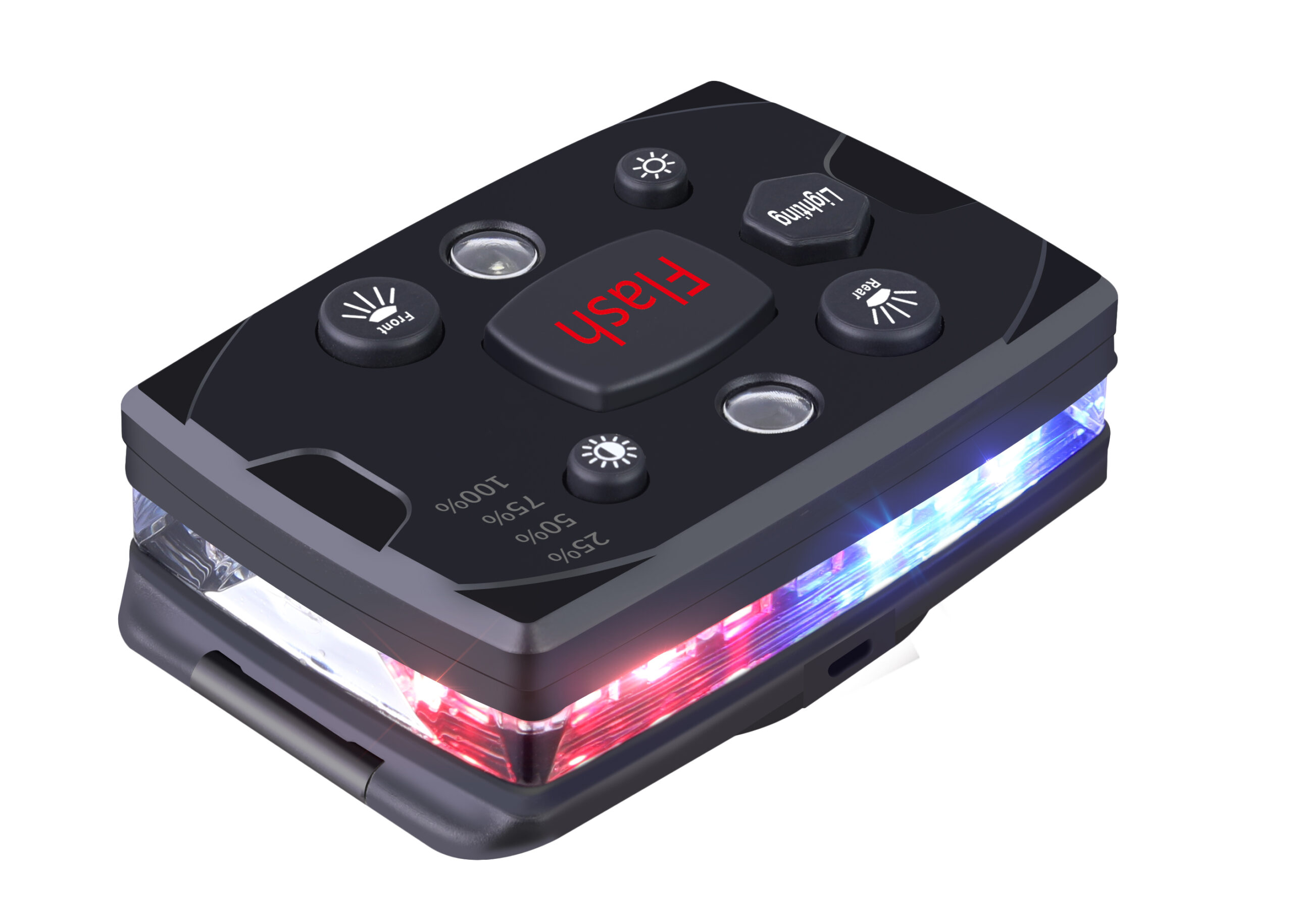
- Guardian ProX should be tested with the document before the team scales the rule across users or sites.
Who This Guide Is For
This guide is for safety managers, supervisors, public works teams, road crews, warehouse yards, event operators, and contractors. It is designed for roadside work, loading docks, backup zones, parking lots, temporary traffic control, fog, rain, dusk, and event staff movement, where a wearable safety light must become a repeatable practice rather than a one-time product handout.
The Safety Management Problem
Teams may add wearable lights without asking which hazard the light addresses, or they may miss a visibility gap because the task plan only lists PPE in general terms. The desired outcome is practical: The safety lead wants a practical way to include active visibility in a task review without pretending it replaces other controls.
Document Template Fields
| Field | What to write | How to use it |
|---|---|---|
| Owner | Who owns the document and checks that it is used. | Name a supervisor or safety lead. |
| User group | Which workers, visitors, contractors, or teams the document covers. | Avoid vague all-staff language when the risk is role-specific. |
| Use condition | When the light is required, optional, or not appropriate. | Connect the rule to real tasks and visibility conditions. |
| Mount and mode | Where the light is worn and which default mode is used. | Photograph the approved setup. |
| Evidence | What record proves the document was used. | Keep the record in the project or safety folder. |
| Existing controls | List PPE, lighting, barriers, signs, route rules, radios, and supervision. | Shows what the light supplements. |
| Visibility gap | Describe the moment when the worker is not recognized soon enough. | Defines whether active visibility is useful. |
Execution Workflow
| Step | What happens | Pass standard |
|---|---|---|
| Prepare | Define user group, task, environment, and visibility risk. | The document does not become generic. |
| Demonstrate | Show the approved light, mount, mode, and charging location. | Users see the real setup. |
| Verify | Ask the user or supervisor to repeat the rule. | Confirms understanding. |
| Record | Capture signature, checklist, photo, issue note, or audit result. | Creates evidence. |
| Improve | Review issues, near misses, dead batteries, and user friction. | Updates the program before problems repeat. |
Step-by-Step Use Process
- Identify the user group and task covered by the document.
- Explain the visibility problem in plain language.
- Show the approved wearable safety light mount and default mode.
- Confirm the charging, storage, inspection, and issue-reporting rule.
- Record completion or corrective action.
- Review the document after the first week, after a near miss, or when the work condition changes.
For wearable safety light job hazard analysis guide, the first useful action is: Map the task steps and mark where the worker is exposed to moving vehicles, equipment, crowds, or low-visibility conditions.
Evidence to Keep
| Evidence | What it proves | How to use it |
|---|---|---|
| Approved mount photo | Shows where the light should be worn. | Use it for training and audits. |
| Completed document | Shows the talk, check, audit, JHA, or sign-off was done. | Supports accountability. |
| Issue record | Shows dead battery, damage, wrong mode, missing mount, or user concern. | Turns problems into corrective action. |
| Supervisor note | Shows field observation and follow-up. | Prevents paper compliance only. |
| Review date | Shows when the rule should be revisited. | Keeps the program current. |
Common Mistakes to Avoid
- Writing a document that does not mention the actual task or visibility problem.
- Treating the light as a replacement for PPE, traffic control, supervision, or site rules.
- Failing to show the approved mount and mode with the user's real clothing or gear.
- Keeping no evidence that the talk, check, audit, training, or review happened.
- Ignoring user friction such as glare, snagging, discomfort, charging confusion, or hidden placement.
- Not updating the document after a near miss, new shift, new clothing, or changed work area.
Internal Reading Path
Use these related guides to connect this document with deployment, training, audits, near-miss review, procurement, and technical field testing.
- Wearable Safety Light for Backup Zones and Blind Spots
- Wearable Safety Light for Temporary Traffic Control Setup
- Wearable Safety Light Visible Distance Test
- Active Visibility vs Reflective Vest
- Wearable Safety Light Safety Program Roadmap
- Wearable Safety Light Toolbox Talk: 10-Minute Briefing for Night Work Crews
- Wearable Safety Light Pre-Shift Inspection Checklist for Crews and Supervisors
- Wearable Safety Light Supervisor Audit Checklist for Field Use, Charging, and User Adoption
- Wearable Safety Light Contractor and Visitor Policy Guide for Shared Worksites
- Wearable Safety Light PPE Compatibility Audit: Vests, Helmets, Harnesses, Radios, and Body Cameras
- Wearable Safety Light Incident Investigation Questions for Visibility-Related Near Misses
Implementation Checklist
- Define the exact task and user group.
- Show the approved light, mount, default mode, and charging return point.
- Explain when the light is required and when it is only supplemental.
- Record completion, user questions, and any failed check.
- Assign one person to follow up on damage, missing units, dead batteries, or user friction.
- Review the document after first use, near misses, seasonal gear changes, or new work conditions.
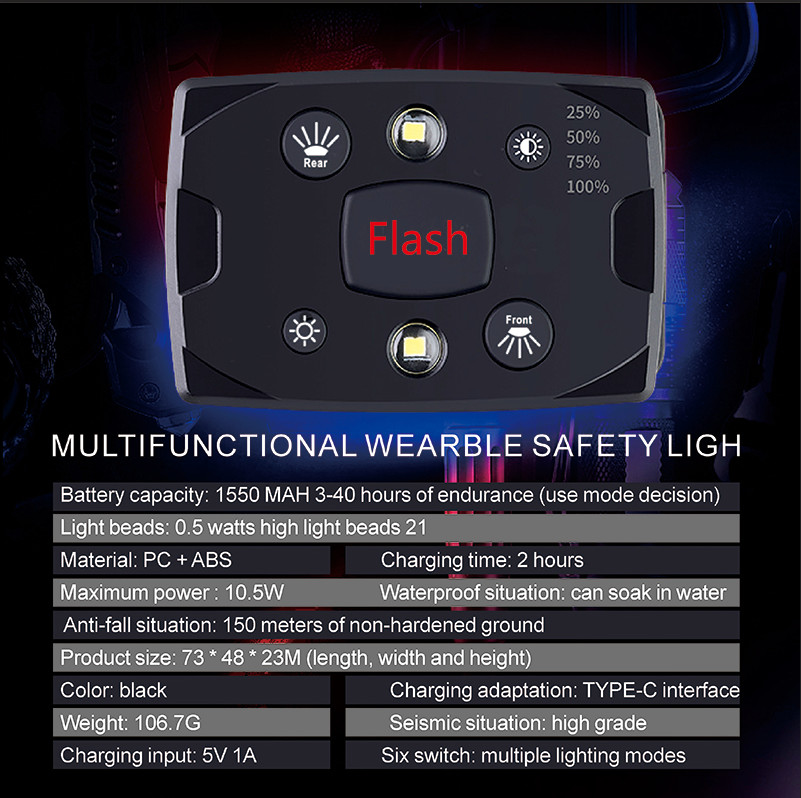
Make the Document Field-Usable
A safety document should be short enough to use during real work and specific enough to change behavior. This matters in roadside work, loading docks, backup zones, parking lots, temporary traffic control, fog, rain, dusk, and event staff movement because Teams may add wearable lights without asking which hazard the light addresses, or they may miss a visibility gap because the task plan only lists PPE in general terms.
The desired result is The safety lead wants a practical way to include active visibility in a task review without pretending it replaces other controls. A good document should make that result easier to repeat, not harder to manage.
Show the Approved Setup
Users learn faster when they see the actual light, mount, mode, charger, and storage point instead of only hearing a rule. This matters in roadside work, loading docks, backup zones, parking lots, temporary traffic control, fog, rain, dusk, and event staff movement because Teams may add wearable lights without asking which hazard the light addresses, or they may miss a visibility gap because the task plan only lists PPE in general terms.
The desired result is The safety lead wants a practical way to include active visibility in a task review without pretending it replaces other controls. A good document should make that result easier to repeat, not harder to manage.
Separate Compliance From Effectiveness
A signed sheet is not enough if the light is hidden, dead, uncomfortable, or ignored during the real task. This matters in roadside work, loading docks, backup zones, parking lots, temporary traffic control, fog, rain, dusk, and event staff movement because Teams may add wearable lights without asking which hazard the light addresses, or they may miss a visibility gap because the task plan only lists PPE in general terms.
The desired result is The safety lead wants a practical way to include active visibility in a task review without pretending it replaces other controls. A good document should make that result easier to repeat, not harder to manage.
Use Supervisor Observation
Supervisors should check what happens in the field, not only whether a document exists in a folder. This matters in roadside work, loading docks, backup zones, parking lots, temporary traffic control, fog, rain, dusk, and event staff movement because Teams may add wearable lights without asking which hazard the light addresses, or they may miss a visibility gap because the task plan only lists PPE in general terms.
The desired result is The safety lead wants a practical way to include active visibility in a task review without pretending it replaces other controls. A good document should make that result easier to repeat, not harder to manage.
Turn Problems Into Updates
A missing charger, wrong mode, or blocked mount is not just a user mistake. It may reveal a weak process. This matters in roadside work, loading docks, backup zones, parking lots, temporary traffic control, fog, rain, dusk, and event staff movement because Teams may add wearable lights without asking which hazard the light addresses, or they may miss a visibility gap because the task plan only lists PPE in general terms.
The desired result is The safety lead wants a practical way to include active visibility in a task review without pretending it replaces other controls. A good document should make that result easier to repeat, not harder to manage.
Connect Documents Together
Toolbox talks, sign-offs, inspections, audits, incident reviews, and program roadmaps should support the same approved rule. This matters in roadside work, loading docks, backup zones, parking lots, temporary traffic control, fog, rain, dusk, and event staff movement because Teams may add wearable lights without asking which hazard the light addresses, or they may miss a visibility gap because the task plan only lists PPE in general terms.
The desired result is The safety lead wants a practical way to include active visibility in a task review without pretending it replaces other controls. A good document should make that result easier to repeat, not harder to manage.
Make the Document Field-Usable
A safety document should be short enough to use during real work and specific enough to change behavior. This matters in roadside work, loading docks, backup zones, parking lots, temporary traffic control, fog, rain, dusk, and event staff movement because Teams may add wearable lights without asking which hazard the light addresses, or they may miss a visibility gap because the task plan only lists PPE in general terms.
The desired result is The safety lead wants a practical way to include active visibility in a task review without pretending it replaces other controls. A good document should make that result easier to repeat, not harder to manage.
Show the Approved Setup
Users learn faster when they see the actual light, mount, mode, charger, and storage point instead of only hearing a rule. This matters in roadside work, loading docks, backup zones, parking lots, temporary traffic control, fog, rain, dusk, and event staff movement because Teams may add wearable lights without asking which hazard the light addresses, or they may miss a visibility gap because the task plan only lists PPE in general terms.
The desired result is The safety lead wants a practical way to include active visibility in a task review without pretending it replaces other controls. A good document should make that result easier to repeat, not harder to manage.
Separate Compliance From Effectiveness
A signed sheet is not enough if the light is hidden, dead, uncomfortable, or ignored during the real task. This matters in roadside work, loading docks, backup zones, parking lots, temporary traffic control, fog, rain, dusk, and event staff movement because Teams may add wearable lights without asking which hazard the light addresses, or they may miss a visibility gap because the task plan only lists PPE in general terms.
The desired result is The safety lead wants a practical way to include active visibility in a task review without pretending it replaces other controls. A good document should make that result easier to repeat, not harder to manage.
Use Supervisor Observation
Supervisors should check what happens in the field, not only whether a document exists in a folder. This matters in roadside work, loading docks, backup zones, parking lots, temporary traffic control, fog, rain, dusk, and event staff movement because Teams may add wearable lights without asking which hazard the light addresses, or they may miss a visibility gap because the task plan only lists PPE in general terms.
The desired result is The safety lead wants a practical way to include active visibility in a task review without pretending it replaces other controls. A good document should make that result easier to repeat, not harder to manage.
Turn Problems Into Updates
A missing charger, wrong mode, or blocked mount is not just a user mistake. It may reveal a weak process. This matters in roadside work, loading docks, backup zones, parking lots, temporary traffic control, fog, rain, dusk, and event staff movement because Teams may add wearable lights without asking which hazard the light addresses, or they may miss a visibility gap because the task plan only lists PPE in general terms.
The desired result is The safety lead wants a practical way to include active visibility in a task review without pretending it replaces other controls. A good document should make that result easier to repeat, not harder to manage.
FAQ
What is wearable safety light job hazard analysis guide for roadside, yard, and event work?
It is a practical safety-program document that helps teams use wearable safety lights consistently by defining the visibility questions inside a task hazard review.
Does this replace a formal safety program?
No. It is a practical support document. Teams should still follow local rules, required PPE, site procedures, supervision, traffic control, and professional safety requirements.
What should the supervisor do first?
Map the task steps and mark where the worker is exposed to moving vehicles, equipment, crowds, or low-visibility conditions.
What evidence should the team keep?
Keep the completed checklist, briefing note, sign-off, photos of approved placement, issue records, user feedback, and any corrective action notes.
How can Guardian ProX be used with this document?
Guardian ProX can be used as the sample device while the team tests the mount, mode, charging routine, user acceptance, and supervisor verification process.
Recommended Next Step
If this document matches your safety program, test Guardian ProX wearable safety light with one real user group first. Use the test to confirm the mount, mode, charging routine, supervisor evidence, and user acceptance before wider rollout.
New Wearable Safety Light Environment Risk Guides
These guides help teams evaluate blind corners, narrow walkways, mixed traffic, low-speed vehicle zones, temporary parking, high-noise worksites, dark uniforms, backlit workers, and pedestrian routes before writing a wearable safety light rule.
- Wearable Safety Light for Blind Corners: How to Make Workers Recognizable Before Turning Points
- Wearable Safety Light for Narrow Walkways, Service Corridors, and Shared Pedestrian Routes
- Wearable Safety Light for Mixed Traffic Areas: People, Carts, Forklifts, Trucks, and Guests
- Wearable Safety Light for Low-Speed Vehicle Areas: Golf Carts, UTVs, Yard Trucks, and Service Carts
- Wearable Safety Light for Temporary Parking Areas: Events, Construction, Overflow Lots, and Shuttle Stops
- Wearable Safety Light for High-Noise Worksites: When Verbal Warnings and Radios Are Not Enough
- Wearable Safety Light for Dark Uniforms and Low-Contrast Clothing in Night Operations
- Wearable Safety Light for Backlit Workers: Headlights, Work Lights, Shadows, and Silhouettes
- Wearable Safety Light Pedestrian Route Assessment for Yards, Campuses, Events, and Facilities
- Wearable Safety Light Environment Risk Hub: Blind Corners, Walkways, Mixed Traffic, Noise, and Low Contrast